Runtime Mesh Generation in Unity

Passionate Unity Game Developer with blending technical skills and creativity to craft immersive gaming experiences 🎮 . I specialize in gameplay mechanics, visual fidelity, and writing clean code. I’m driven by game design principles and love creating engaging, interactive experiences. Always eager to learn and explore new gaming trends! Let's connect! 🌟🚀
What is Runtime Mesh Generation?
Runtime mesh generation refers to the ability to create and manipulate meshes dynamically during the execution of a game or application. Instead of relying on pre-built 3D models, you can generate complex geometries, such as terrains, grids, or other structures, directly within Unity at runtime. This technique is useful when you want to build procedurally generated environments or custom meshes that adapt to user input or game mechanics.
Where Can We Use Runtime Mesh Generation?
Here are some examples of where runtime mesh generation can play a crucial role in games:
Procedural Terrain Generation: Games like Minecraft generate infinite terrain at runtime, allowing players to explore expansive worlds. The terrain mesh adapts as players move, making each game session unique.
Dungeon Generation: In roguelike or dungeon crawler games, rooms, hallways, and obstacles are generated at runtime to create randomized dungeons.
City Generation: Games that simulate urban environments can procedurally create entire cities at runtime, varying building layouts, streets, and terrain.
Mesh Cutting & Destruction: Games that feature destructible environments use runtime mesh cutting to simulate realistic damage, such as slicing objects or terrain deformation during explosions.
Basics of Unity Mesh Generation
Before diving into the code, we first need to understand how Unity represents meshes. A mesh is made up of several components, for basic mesh creation we need two components vertices & triangles. In Unity, a quad (a simple 2D plane) is built using two triangles. Each triangle connects three vertices to define a surface.
Vertices: Points in 3D space that form the corners of the mesh.
Triangles: The surface of a mesh is formed by connecting vertices into triangles. Unity builds meshes using triangles because they are the simplest polygon that can represent any surface.
UV Coordinates: These map a 2D texture onto the 3D surface, defining how the texture wraps around the mesh.We must have to calculate uv coordinates system while create triangles.
How Unity Mesh Generation Works
In C# Unity mesh generation programming, the core idea is to dynamically create 3D shapes by defining vertices, triangles, and other attributes like UVs and normals using Unity's Mesh class.
To render a mesh, you need two components: MeshFilter, which holds the mesh data.
MeshRenderer, which displays the mesh with visual properties like materials and textures.
First, a Mesh object is created, and vertices are defined in 3D space, triangles are then formed by connecting these vertices in groups of three, and UV coordinates are optionally added for texturing.
Finally, the vertices, triangles, and UVs are assigned to the Mesh, and Mesh to a MeshFilter. We can optimized mesh with recalculations of normals and bounds to ensure proper lighting and performance.
Lets understand a basic plane (quad) with four corner points
Let’s first explore how to create a simple quad using two triangles.
Vertices, Triangles, and UV Mapping
Vertices: For a quad, we need four vertices, which represent the four corners of the shape:
- (0, 0), (1, 0), (0, 1), and (1, 1).
Triangles: To form a quad, we need two triangles:
The first triangle connects the bottom-left, top-left, and bottom-right vertices.
The second triangle connects the top-left, bottom-right, and top-right vertices.
So, the order of vertex indices for the triangles would be:
First triangle: 0, 1, 2
Second triangle: 1, 2, 3
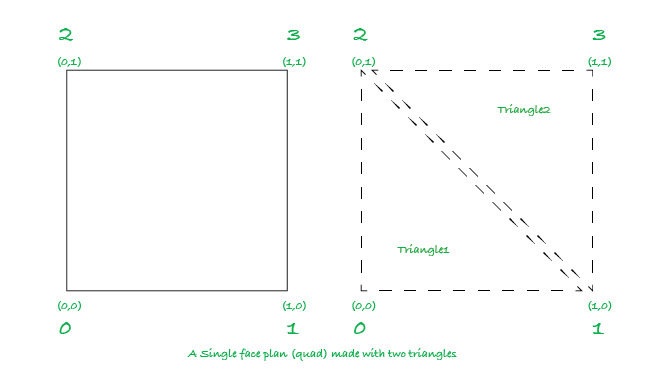
- UV Mapping: UV coordinates are used to map a texture onto the quad. In 3d model, UVs map each vertex to a point on a 2D texture, ranging from (0, 0) to (1, 1), just like the vertices.
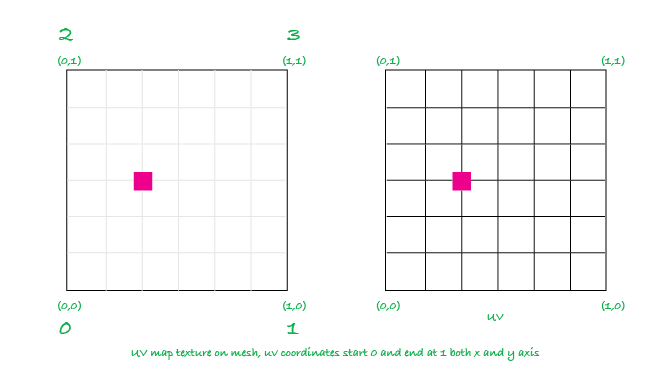
Lets Create in Unity
Setting Up the GameObject:
Create an empty GameObject (
Right-click in the Hierarchy > Create Empty), and name it something like "MeshObject."Attach a MeshFilter and a MeshRenderer component to this object (
Add Component > MeshFilterandAdd Component > MeshRenderer).
What are MeshFilter and MeshRenderer?
The MeshFilter holds the mesh data, including vertices, triangles, UVs, etc.
The MeshRenderer is responsible for rendering the mesh to the screen and controls the material and lighting.
Create and Attach Script:
In the Assets folder, create a new script named
MeshGenerator.cs.Attach this script to your MeshObject.
using UnityEngine;

[RequireComponent(typeof(MeshFilter), typeof(MeshRenderer))]
public class MeshGenerator : MonoBehaviour
{
    void Start()
    {
        Mesh mesh = new Mesh();
        GetComponent<MeshFilter>().mesh = mesh;

        // Define the vertices for the plane (a quad)
        Vector3[] vertices = new Vector3[4]
        {
            new Vector3(0, 0, 0),    // Bottom-left
            new Vector3(1, 0, 0),    // Bottom-right
            new Vector3(0, 1, 0),    // Top-left
            new Vector3(1, 1, 0)     // Top-right
        };

        // Define the triangles that make up the quad
        int[] triangles = new int[6]
        {
            // First triangle (bottom-left, top-left, bottom-right)
            0, 2, 1,
            // Second triangle (top-left, top-right, bottom-right)
            2, 3, 1
        };

        // Define the UV coordinates for texturing the quad
        Vector2[] uv = new Vector2[4]
        {
            new Vector2(0, 0),    // Bottom-left
            new Vector2(1, 0),    // Bottom-right
            new Vector2(0, 1),    // Top-left
            new Vector2(1, 1)     // Top-right
        };

        // Assign the vertices, triangles, and UVs to the mesh
        mesh.vertices = vertices;
        mesh.triangles = triangles;
        mesh.uv = uv;

        // Recalculate normals and bounds for proper rendering
        mesh.RecalculateNormals();
        mesh.RecalculateBounds();
    }
}
Create a Dynamic Plane
To create a dynamic plane with any number of rows and columns of vertices, we need to generate the vertices, UVs, and triangles dynamically based on the number of rows and columns. Here's how you can modify the script to achieve this:
using System;
using UnityEngine;

namespace MySlicer
{
    [RequireComponent(typeof(MeshFilter), typeof(MeshRenderer))]
    public class MeshGenerator: MonoBehaviour
    {
        [SerializeField] private int _rows = 10; // Vertical value (how many y or z )
        [SerializeField] private int _columns = 10; // Horizontal value (how many x points)
        private MeshFilter _meshFilter;
        private MeshRenderer _meshRenderer;
        private void Start()
        {
            Mesh mesh = new Mesh();
            _meshFilter = GetComponent<MeshFilter>();
            _meshRenderer = GetComponent<MeshRenderer>();
            _meshFilter.mesh = mesh;

            // Calculate the number of vertices
            Vector3[] vertices = new Vector3[(_rows + 1) * (_columns + 1)];
            Vector2[] uv = new Vector2[(_rows + 1) * (_columns + 1)];
            int[] triangles = new int[(_rows * _columns) * 6];


            for ( int i = 0,  r = 0; r <= _rows; r++)
            for (int c = 0; c <= _columns; c++, i++)
            {
                 vertices[i] = new Vector3(c, r, 0);
                 uv[i] = new Vector3( (float)c/_columns, (float)r/_rows);
            }

            // Generate triangles
            int triangle = 0;
            for (int r = 0, v = 0 ; r < _rows; r++, v++)
            for (int c = 0; c < _columns; c++, v++)
            {
                // First triangle of the quad
                triangles[triangle] = v ;
                triangles[triangle+2] = v + 1 ;
                triangles[triangle+1] = v + _columns + 1 ;

                // Second triangle of the quad
                triangles[triangle+3] = v + 1 ;
                triangles[triangle+4] = v + _columns + 1 ;
                triangles[triangle+5] = v + _columns + 2 ;

                triangle += 6; // Move to the next quad
            }

            // Assign the vertices, triangles, and UVs to the mesh
            mesh.vertices = vertices;
            mesh.triangles = triangles;
            mesh.uv = uv;

            // Recalculate normals and bounds for proper rendering
            mesh.RecalculateNormals();
            mesh.RecalculateBounds();
        }
    }
}
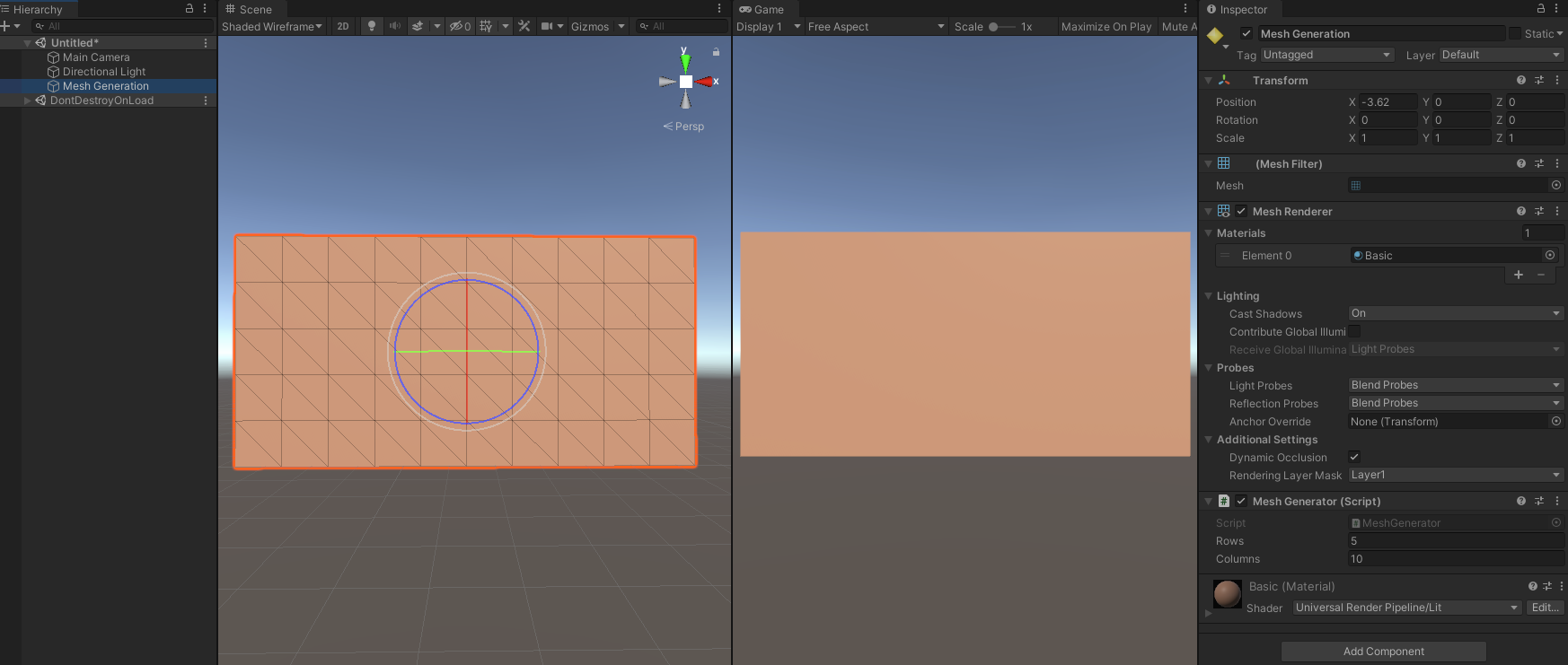
Here, rows and columns represent how many subdivisions we want in the grid.
Mesh mesh = new Mesh()create a unity Mesh object and_meshFilter.mesh = meshwe asign this mesh to our MeshFilter already added in unity inspector.Vertices: We create an array to store all the vertices for the mesh. For a grid with N rows and M columns, the number of vertices is (N + 1) * (M + 1). This includes the extra vertices needed at the boundaries of the grid.
UVs: UVs must match the number of vertices. Each vertex gets a corresponding UV coordinate, mapping the texture to the quad.
Triangles: Each quad is made up of two triangles. Since each triangle uses 3 vertices, the total number of triangles is rows columns 6 (6 indices for each quad, 3 per triangle).
Assign all vertices and triangles and uv to the mesh object.
mesh.vertices = vertices; mesh.triangles = triangles; mesh.uv = uv;RecalculateNormals(): This function is necessary for Unity to calculate how light interacts with the surface of the mesh. Normals affect lighting and shading on the surface, ensuring the mesh appears correctly in the scene.
RecalculateBounds(): This function updates the bounding box around the mesh, ensuring proper visibility and further collision detection.
Conclusion
Runtime mesh generation in Unity gives you powerful control over the way your game world and objects are built and displayed. By understanding how vertices, triangles, and UV mapping work together, you can create dynamic and flexible content. From procedural terrain to destructible objects, runtime meshes open new possibilities for creating interactive, responsive game environments. With this foundation, you can now explore more advanced topics like runtime optimizations, mesh manipulation, and complex procedural generation. Happy coding!